Mac Compatibility: This plugin is not currently compatible with Mac OS.
Plugin Updates: All updates for the first year are free.
The plugin license is perpetual.
After the first year, if you need updates or support, you’ll need to purchase a renewal.
Automation License enables programmatic export via plugin API
Function can be called within the same host application
No user intervention or GUI required for export
Supports C++ or C# based integration
Standard input parameters drive automated export process
Seamless file export experience for end users
Output is generated directly for downstream workflows
Standard input parameters drive automated export process
Elevate your SolidWorks experience
Features
Mesh Quality
Control to adjust mesh quality from preferences dialog.
Export Texture
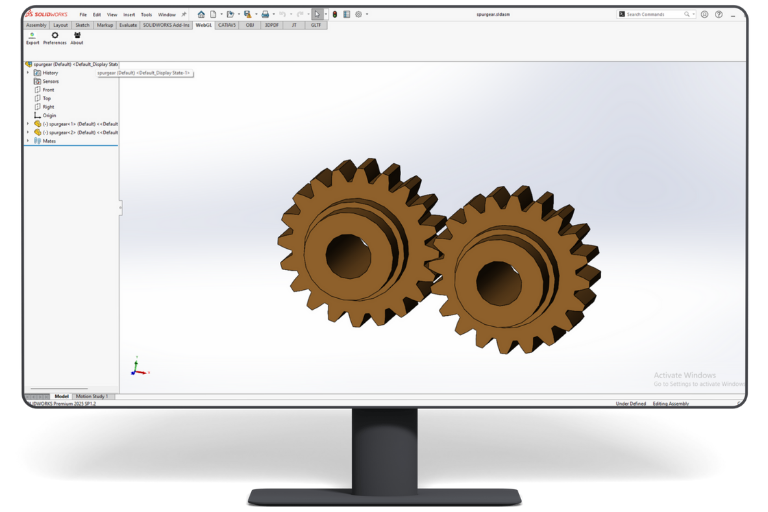
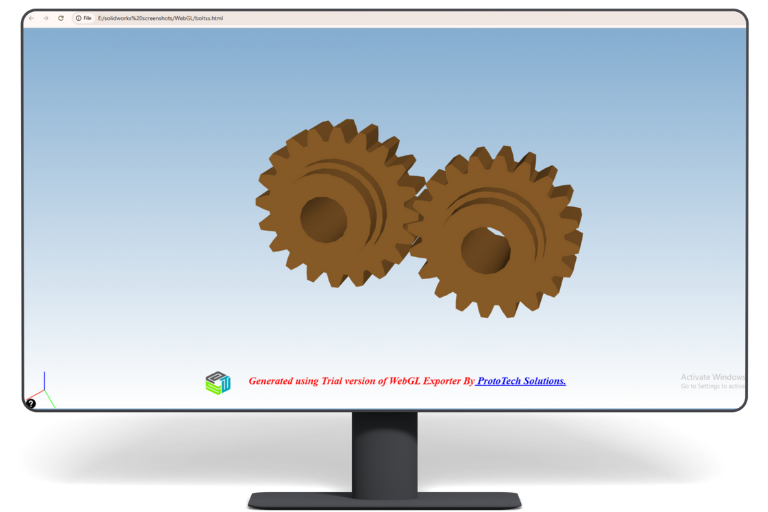
Exports tessellated model data along with texture information
Face Level Color
1. Embed 3D Model to your existing PDF.
2. Supports face level colors.
3. Embed 3D Model to your existing PDF.
4. Option to control the file size and quality by specifying the precision value.
5. A default compression which helps to reduce the file size as much as possible.
6. Integrate your exported 3D model in the web page.
Additional
Info.
WebGL Exporter for Solidworks Version History
17/04/2025
6.0.25099.3557
Enhancement:
Added 2025 Support.
Added Error Report Support.
Added VR Support.
22/10/2021
5.0.21246.3358
Enhancement:
Resolved Licensing issue
Open Exported File Location
14/11/2019
4.5.19316.3141
Fixed:
Issues in license mechanism.
12/06/2019
4.4.19157.3065
Enhancement:
Upgraded licensing system.
03/04/2019
4.3.0.0
Fixed:
Fixes to license system.
02/12/2019
4.2.0.0
Fixed:
Some textures were missing in the exported file.
08/23/2018
4.1.0.0
Enhancement:
Added texture support.(Without Scaling)
Added progress bar and improved default settings.
Fixed:
Zoom to fit scenario for some models was incorrect.
07/23/2018
4.0.0.0
Enhancement:
Added support for SOLIDWORKS 2019.
03/20/2018
3.1
Enhancement:
Automation APIs were not working correctly.
Assembly tree was not displayed correctly in Browser Pane.
08/03/2017
3.0
Enhancement:
Added support of Solidworks 2017.
05/25/2016
2.3
Enhancement:
Supports HTML templates.
WebGL models will get automatically embedded in the selected template.
09/15/2015
1.7
Enhancement:
Changed license activation process.
05/08/2015
1.6
Fixed:
Licensing issue solved.
05/07/2015
1.5
Enhancement:
Home View Supported in SolidWorks WebGL.
03/04/2015
1.4
Enhancement:
Added support if a part has different configuration.
"We at Pulse Systems create value enhancing software solutions. For our Pulse PLM Suite, a leading product lifecycle management solution, we needed an expert team with 3D software development skills. ProtoTech Solutions turned out to be perfect partners for us. They helped us right from making technology decisions to design and implementation of our ideas. We are very happy with their talent and responsiveness and highly recommend them to anyone needing software development services."
Craig Dennis
CTO ,TransMagic Inc
"Thank you for doing such a great job - we're very excited about this new product and our Prototech team. We've got a winner here."
Biplab Sarkar
CEO, Nemetschek Vectorworks
"It has been a pleasure working with the ProtoTech development team. We were looking for a technically competent professional off-site development team for some of the core feature developments in Vectorworks. And ProtoTech stepped up to the plate and delivered the functionality with quality in a timely fashion. The team leaders kept us up to date with status updates and discussed future plans on a regular basis making it easy for us to proactively solve the problems down the line. In short, the partnership with ProtoTech has been very fruitful."
David Little
Intergraph (United States)
"Professionally network team building materials without goal-oriented e-tailers. Collaboratively brand business portals through team building experiences. Completely target intuitive web-readiness vis-a-vis."
Henry Uyeme
CEO, Intrida
"We had presented a very challenging set of objectives requiring intricate engineering processes. This was expertly handled by ProtoTech Solutions, with a high degree of technology expertise, deep understanding of product requirements and excellent communications. This has naturally lead to a perfect partnership which we are very proud of. Many thanks to ProtoTech Solutions!"
Brad Strong
Technical Communications Director, TransMagic Inc.
"I want to take a moment to applaud the ProtoTech team for their outstanding problem-solving abilities. They are a true force of nature when it comes to tackling complex issues. Their dedication and expertise shine through, making them an invaluable asset to our team here at TransMagic. Their relentless pursuit of solutions, even amidst chaos, is a huge relief and a testament to their unwavering commitment. Working with ProtoTech is an honor. It's inspiring to witness such diligent and skillful collaboration on a shared goal, transcending cultural boundaries and spanning thousands of miles. It gives me a glimmer of hope for the human race when I see a team like yours working together with unwavering enthusiasm and a positive attitude. Thank you all for your dedication and the exceptional work you do every day."
Peter Saal
Product Manager, Trimble
"We are very impressed with the ProtoTech team's unprompted willingness to always ‘go the extra mile’. They did an outstanding job dealing with our application-specific challenges (multiface texture export, the export of polyline entities, model tree hierarchy, etc.), and optimizing large files down to very compact ones, reducing them in some cases by almost 70%. Their strong understanding of current development practices and professional attention to detail make them a dependable development partner. "
Ron Fritz
Tech Soft 3D , CEO
"Our relationship with ProtoTech has been highly beneficial to many ISV’s using TS3D components. By providing high-value development services to complement our rich components, the team at ProtoTech helps engineering ISV’s build better software, faster. Based on our experience we would recommend them highly as a services partner for any engineering software project."
Zoé Bezpalko,
Senior Sustainability Strategy Manager / Autodesk
"The new Makersite add-on for Fusion 360 is a game changer in enabling designers to make high-confidence decisions on CO2 and costs in real-time, by leveraging sustainability insights within Autodesk Fusion 360’s product design environment. Thanks to ProtoTech's expertise, we were able to implement this solution quickly and in a collaborative way with Makersite. The Makersite add-on for Fusion 360 is now available on the Autodesk App Store for users to download and apply to customers’ projects, so they can design cost-effective sustainable products at scale."
Tim Loduha,
Senior Director / Roblox
"For six years and counting, ProtoTech has been an extremely valuable quality assurance partner for Roblox. The thorough and disciplined testing conducted by ProtoTech'sQA team gives us great confidence that we are delivering high-quality product updates to our millions of users. They go to great lengths to not only uncover defects but also suggest product and process improvements. We highly recommend ProtoTech's QA experts for software testing."
What Our Customers Are Saying About Us
Get FREE Product Demo
Frequently Asked Questions
What SolidWorks file types does the WebGL Exporter support?
It supports SolidWorks part, assembly, and drawing documents, including .SLDPRT, .SLDASM, and .SLDDRW, within a supported SolidWorks installation.
Which SolidWorks versions work with the WebGL Exporter?
ProtoTech’s plugin is updated for the latest supported releases within SolidWorks versions 2022–2025.
Which operating systems are supported by ProtoTech’s WebGL Exporter for SolidWorks?
Yes. It is designed for supported SolidWorks installations on Windows 10 and Windows 11.
Does the WebGL Exporter include a free trial?
Yes. The trial version is activated automatically after installation and includes 30 exports for 15 days. Does not require a license key for trial use.
Can WebGL models be embedded into an existing website?
Yes. The generated output is intended for integration into web pages, product portals, online catalogs, and collaboration applications.
Does WebGL export preserve SolidWorks textures?
The exporter is designed to transfer tessellated model data with supported texture information for a more recognizable web presentation.
Can I adjust WebGL mesh quality?
Yes. Mesh-quality preferences let you choose the level of geometric detail required for the browser experience.
Can SolidWorks assemblies be exported to WebGL?
Yes. Supported assembly content can be converted into a web-viewable representation for product and design communication.
What should I check if the WebGL model loads slowly?
Reduce mesh detail and texture size, enable suitable compression, verify web-server delivery, and test the output in a current browser.
Cookie Consent
We use cookies to improve your experience on our site. By using our site, you consent to cookies.
Contains information related to marketing campaigns of the user. These are shared with Google AdWords / Google Ads when the Google Ads and Google Analytics accounts are linked together.
90 days
__utma
ID used to identify users and sessions
2 years after last activity
__utmt
Used to monitor number of Google Analytics server requests
10 minutes
__utmb
Used to distinguish new sessions and visits. This cookie is set when the GA.js javascript library is loaded and there is no existing __utmb cookie. The cookie is updated every time data is sent to the Google Analytics server.
30 minutes after last activity
__utmc
Used only with old Urchin versions of Google Analytics and not with GA.js. Was used to distinguish between new sessions and visits at the end of a session.
End of session (browser)
__utmz
Contains information about the traffic source or campaign that directed user to the website. The cookie is set when the GA.js javascript is loaded and updated when data is sent to the Google Anaytics server
6 months after last activity
__utmv
Contains custom information set by the web developer via the _setCustomVar method in Google Analytics. This cookie is updated every time new data is sent to the Google Analytics server.
2 years after last activity
__utmx
Used to determine whether a user is included in an A / B or Multivariate test.
18 months
_ga
ID used to identify users
2 years
_gali
Used by Google Analytics to determine which links on a page are being clicked
30 seconds
_ga_
ID used to identify users
2 years
_gid
ID used to identify users for 24 hours after last activity
24 hours
_gat
Used to monitor number of Google Analytics server requests when using Google Tag Manager
1 minute
You can find more information in our Cookie Policy .