Mac Compatibility: This plugin is not currently compatible with Mac OS.
Plugin Updates: All updates for the first year are free.
The plugin license is perpetual.
After the first year, if you need updates or support, you’ll need to purchase a renewal.
"Thanks for your assistance- I appreciate it. Everything is working good and now I can show the cad-work I've I been doing to other people. You guys have been great to work with and helped me with all the issues that I came across. Thanks."
Narayan Sahu
Network Engineer, Al Shirawi
"Excellect Product & Econimical !!
Save much time & generates 3d view quickly. Technical Support responds as quickly as possible."
Paul L. James
Design Source International
"I have worked in the field of Industrial and Architectural Design for 40 years, and have witnessed numerous 3d viewering applications come and go. The most encouraging was the export to interactive .pdf 3d formats allowing anyone with an Acrobat Viewer or .pdf viewer to interact with the design intent in an immersive way Support of these programs was often not good, and the cost was also prohibitive, but the people at ProtoTech Solutions have made this an attractive package as to price point, and their on going support has made it an integrated and highly functional part of our design process and for development to RPD output."
Stas Urba
Founder, SoFi_Game
"Your Plugin not only works but also is very simple to use with lightning speed! This is not being all, it allows to change the export quality which is of vital importance for games, to be specific mobile games. Game creation needs to export numerous models and this plugin solves it very well."
Marcel Straßburg,
RH Industrieservice & Antriebstechnik GmbH & Co. KG
"I checked your preview and am very happy about the results in this short time, you have redesigned. I am surprised and glad to see, my feedback gets a serious effect on further developing your plugin immediately. This is an improvement, absolutely. Congratulations to you and your team, you rock"
Alexander Machado
"Great Response time and resolution from the Prototech support team."
Koen
R&D/Visualization, beMatrix
"ProtoTech has perfectly understand our needs. Results are as expected. Response time is very fast. Small changes or enhancements are perfectly implemented, sometimes even in a couple of hours. Thank you!"
Ernesto Sacramento
Surveyor Manager, RAZEL-BEC
"ProtoTech solutions offer very versatile products. We use OBJ converter to take engineered conceptual 3D models out of AutoCAD into an OBJ format that is PhotoShop friendly to generate photo-realistic simulations. I have not found another product on the market that makes the process as easy as ProtoTech's OBJ Converter. Proto Tech has friendly and fast customer support as well when needed!"
Lei Lei
People's Republic of China
"This is really a great software for my problems. The company's support is very good, and my problem was soon solved."
Will Wright
EAFab Corporation
"Great Plugin! Bridges the software gap between supplier and client."
Trudi Fajri
Benmax, Australia
"It's great to use - just a different way to what I'm used to - much easier."
Sterling Smith
President & Principal, Interface for Consulting Engineers, P.A.
"Everything went well 🙂 I received what I wanted, it means .gltf file form Fusion360 3D model. I will surely recommend your software 👍"
What Our Customers Are Saying About Us
Get FREE Product Demo
Frequently Asked Questions
What Navisworks file types does ProtoTech’s 3D PDF Exporter support?
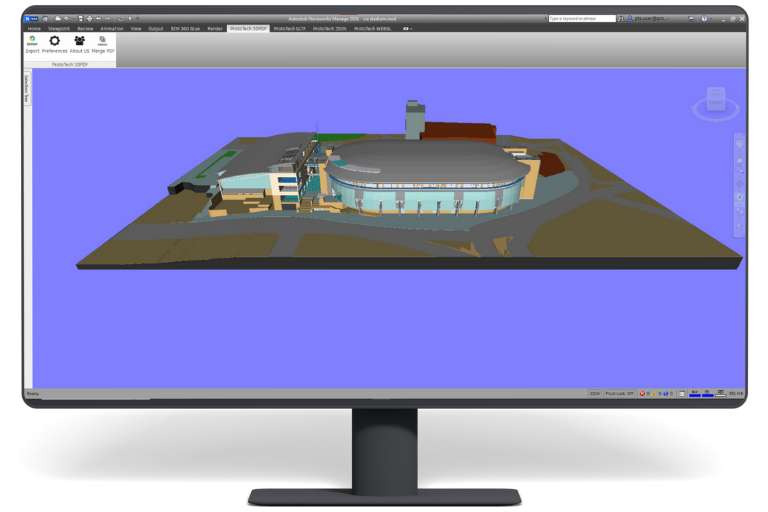
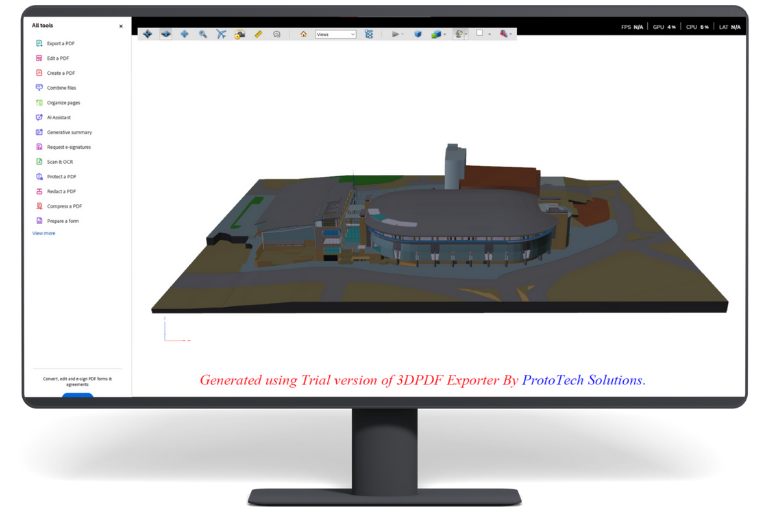
ProtoTech’s 3D PDF Exporter supports models opened in Autodesk Navisworks from NWD, NWF, and NWC files.
Can recipients view the exported 3D PDF without Navisworks?
Yes. Recipients can review the file in a compatible PDF application that supports interactive 3D content.
Can I password-protect a 3D PDF exported from Navisworks?
Yes. The plugin includes an option to encrypt and password-protect the exported PDF.
Can I control the mesh quality of the exported 3D PDF?
Yes. Mesh-quality settings help balance visual detail, export time, and PDF file size.
Can the exporter create a 3D PDF from a custom Navisworks view?
Yes. The plugin supports exporting configured views so teams can present the model from the required perspective.
Can hidden Navisworks elements be included in the 3D PDF?
The exporter provides options for controlling whether hidden model elements are included in the output.
Is a free trial available for ProtoTech’s 3D PDF Exporter for Navisworks?
Yes. The trial activates automatically after installation and includes 30 exports for 15 days, with no license key required.
Which Autodesk Navisworks versions support the 3D PDF Exporter?
ProtoTech’s 3D PDF Exporter is updated for the latest supported Autodesk Navisworks versions (2023–2026).
Which operating systems are supported by ProtoTech’s 3D PDF Exporter for Autodesk Navisworks?
The plugin is designed for supported Autodesk Navisworks installations on Windows 10 and Windows 11.
Cookie Consent
We use cookies to improve your experience on our site. By using our site, you consent to cookies.
Contains information related to marketing campaigns of the user. These are shared with Google AdWords / Google Ads when the Google Ads and Google Analytics accounts are linked together.
90 days
__utma
ID used to identify users and sessions
2 years after last activity
__utmt
Used to monitor number of Google Analytics server requests
10 minutes
__utmb
Used to distinguish new sessions and visits. This cookie is set when the GA.js javascript library is loaded and there is no existing __utmb cookie. The cookie is updated every time data is sent to the Google Analytics server.
30 minutes after last activity
__utmc
Used only with old Urchin versions of Google Analytics and not with GA.js. Was used to distinguish between new sessions and visits at the end of a session.
End of session (browser)
__utmz
Contains information about the traffic source or campaign that directed user to the website. The cookie is set when the GA.js javascript is loaded and updated when data is sent to the Google Anaytics server
6 months after last activity
__utmv
Contains custom information set by the web developer via the _setCustomVar method in Google Analytics. This cookie is updated every time new data is sent to the Google Analytics server.
2 years after last activity
__utmx
Used to determine whether a user is included in an A / B or Multivariate test.
18 months
_ga
ID used to identify users
2 years
_gali
Used by Google Analytics to determine which links on a page are being clicked
30 seconds
_ga_
ID used to identify users
2 years
_gid
ID used to identify users for 24 hours after last activity
24 hours
_gat
Used to monitor number of Google Analytics server requests when using Google Tag Manager
1 minute
You can find more information in our Cookie Policy .










 Autodesk App Store
